Introduction
I was given a task complete. This task was to experience 4 different types VR Art software. After I have done with the experience, my next goal is to document it and add a segment that will include my thoughts; How I relate with these activities, if I want to carry those experiences on for my future.
What I did this week (VR, AR, MR, XR)
I have gained experience and a better understanding of multiple different VR art software. I had a really fun time testing and playing around with the different functions and capabilities. Although I did have some trouble with understanding the ways to create art (some of the functionality was a bit confusing) and in some cases feeling slightly dizzy and disorientated when wearing the headset and also taking off the headset.
What is VR?
Virtual reality, or VR, is a simulated three-dimensional (3D) environment that lets users explore and interact with a virtual surrounding in a way that approximates reality, as it’s perceived through the users’ senses.
The environment is created with computer hardware and software, although users might also need to wear devices such as goggles, headsets or bodysuits to interact with the environment.
Advantages
- Immersive Learning: VR provides an immersive and realistic learning experience, allowing users to interact with virtual environments and objects as if they were real.
- Safe Training Environment: VR enables trainees to practice dangerous or high-risk scenarios in a safe environment, reducing the risk of injury and equipment damage.
- Repeatable Scenarios: Trainees can repeat VR scenarios as often as needed to refine skills and build muscle memory, ensuring consistent and thorough training outcomes.
- Customizable Simulations: VR allows training scenarios to be tailored to specific learning objectives and challenges, enabling personalized and targeted skill development.
- Data Collection and Assessment: VR systems can collect detailed performance data, enabling trainers to assess trainee progress, identify strengths and weaknesses, and adapt training accordingly.
Disadvantages
- Motion Sickness: Some users may experience motion sickness or discomfort due to the sensory disconnect between virtual and physical movements, leading to nausea and dizziness.
- Cost and Accessibility: VR systems can be expensive to develop and maintain, making them less accessible to organizations with limited budgets. High-quality hardware and software requirements can also pose barriers to adoption.
- Ethical Concerns: The immersive nature of VR can desensitize users to violence and blur the line between reality and simulation, raising ethical concerns about its impact on perception and behaviour.
- Learning Curve: Some users may struggle with the learning curve associated with using VR equipment and navigating virtual environments, potentially affecting the efficiency of training programs.
- Isolation and Social Disconnect: Prolonged use of VR can lead to isolation from the real world and reduced face-to-face interaction, potentially impacting social skills and relationships.
What is MR?
MR brings together real world and digital elements. In mixed reality, you interact with and manipulate both physical and virtual items and environments, using next-generation sensing and imaging technologies. Mixed Reality allows you to see and immerse yourself in the world around you even as you interact with a virtual environment using your own hands all without ever removing your headset.
It provides the ability to have one foot (or hand) in the real world, and the other in an imaginary place, breaking down basic concepts between the real and the imaginary, offering an experience that can change the way you game and work today.
Advantages
- Gaming: Mixed reality is being used to create highly immersive gaming experiences that allow players to interact with digital objects in a realistic and intuitive way. For example, Microsoft’s HoloLens headset allows players to build and manipulate virtual structures using hand gestures and voice commands.
- Education: Mixed reality is being used to create interactive educational experiences that allow students to explore complex concepts in a more intuitive way. For example, medical students can use mixed reality to simulate surgical procedures and gain hands-on experience before performing them in real life.
- Healthcare: Mixed reality is being used to create more efficient and effective healthcare experiences. For example, doctors can use mixed reality to visualize medical data in real-time, allowing them to make more accurate diagnoses and treatment decisions.
- Manufacturing: Mixed reality is being used to improve the manufacturing process by allowing engineers to visualize and manipulate 3D models in real-time. This can help to reduce errors and improve efficiency, leading to faster and more cost-effective production.
- Immersive experience: Mixed reality creates a highly immersive experience that allows users to interact with digital objects in a more natural and intuitive way.
- Real-time interaction: Mixed reality allows for real-time interaction between digital and physical objects, creating a seamless blend of the virtual and physical worlds.
- Hands-free operation: Mixed reality headsets allow for hands-free operation, which can be especially useful in situations where users need to keep their hands free for other tasks.
- Increased efficiency: Mixed reality can improve efficiency by providing users with real-time access to information and data, allowing them to make faster and more accurate decisions.
- Cost-effective: Mixed reality technology is becoming more affordable and accessible, making it a cost-effective solution for a wide range of applications.
Disadvantages
- Technical limitations: Mixed reality technology is still relatively new, and there are still technical limitations that need to be addressed, such as limited field of view and processing power.
- User acceptance: Mixed reality technology may not be widely accepted by all users, as some may find the experience disorienting or uncomfortable.
- Privacy and security: Mixed reality technology raises new privacy and security concerns, as it can potentially capture and transmit personal data and information.
- Cost: While mixed reality technology is becoming more affordable, it can still be expensive, especially for high-end applications.
What is XR?
XR is an emerging umbrella term for all the immersive technologies. Those include, augmented reality (AR), virtual reality (VR), and mixed reality (MR) plus those that are still to be created. All immersive technologies extend the reality we experience by either blending the virtual and “real” worlds or by creating a fully immersive experience
Advantages
- Retail: XR gives customers the ability to try before they buy. Watch manufacturer Rolex has an AR app that allows you to try on watches on your actual wrist, and furniture company IKEA gives customers the ability to place furniture items into their home via their smartphone.
- Training: Especially in life-and-death circumstances, XR can provide training tools that are hyper-realistic that will help soldiers, healthcare professionals, pilots/astronauts, chemists, and more figure out solutions to problems or learn how to respond to dangerous circumstances without putting their lives or anyone else’s at risk.
- Remote work: Workers can connect to the home office or with professionals located around the world in a way that makes both sides feel like they are in the same room.
- Marketing: The possibilities to engage with prospective customers and consumers through XR will have marketing professionals pondering all the potential of using XR to their company’s advantage.
- Real estate: Finding buyers or tenants might be easier if individuals can “walk through” spaces to decide if they want it even when they are in some other location.
- Entertainment: As an early adopter, the entertainment industry will continue to find new ways of utilizing immersive technologies.
Disadvantages
- Those developing XR technologies are battling with some of the challenges to mainstream adoption.
- First, XR technologies collect and process huge amounts of very detailed and personal data about what you do, what you look at, and even your emotions at any given time, which has to be protected.
- In addition, the cost of implementing the technology needs to come down; otherwise, many companies will be unable to invest in it. It is essential that the wearable devices that allow a full XR experience are fashionable and comfortable as well as always connected, intelligent, and immersive.
- There are significant technical and hardware issues to solve that include but are not limited to the display, power and thermal, motion tracking, connectivity and common illumination where virtual objects in a real world are indistinguishable from real objects especially as lighting shifts.
Adobe Aero
When experimenting with Adobe Aero, I found it incredibly easy and intuitive to learn. Basically, open the software, put the location you want in the software and place already made models within the specific scene you want, turn it into an AR experience from technically anywhere after I scan a Q r-code.
Process
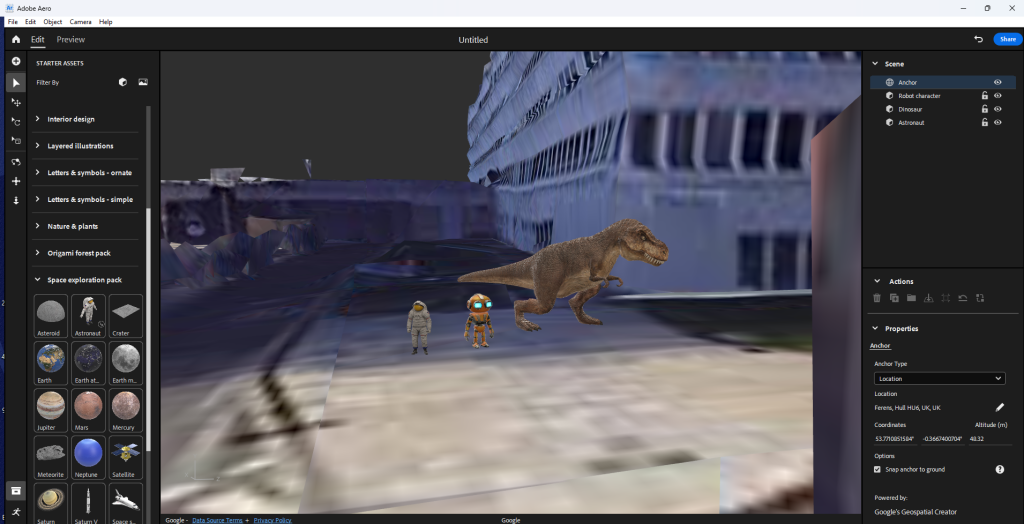
Q r-code
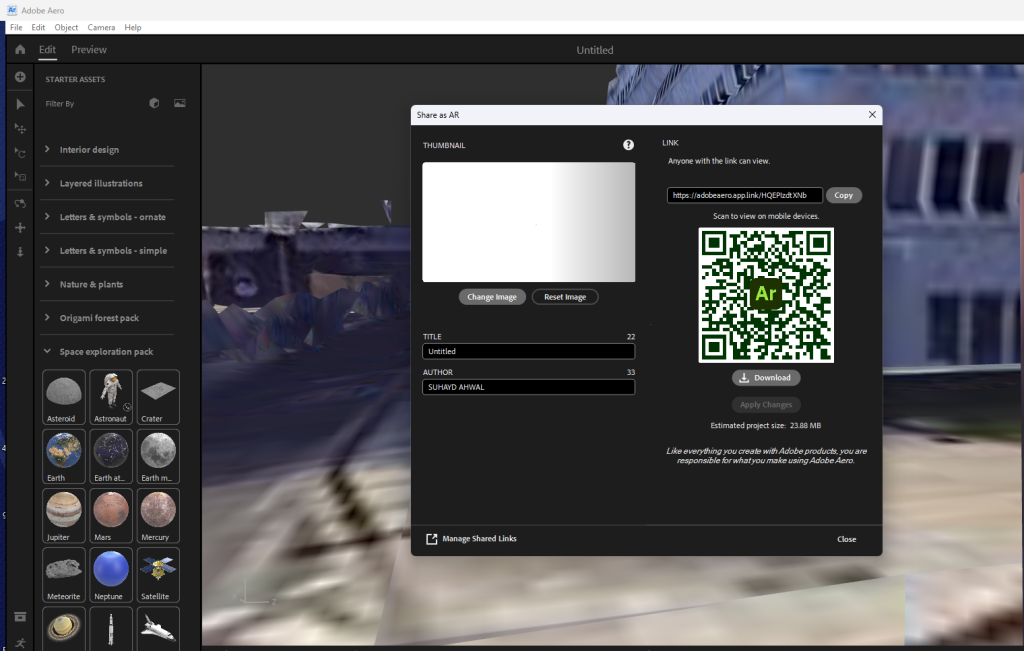
Outcome
Do I plan to use this software again in the future?
No. Out of all the software I’ve experienced, this software was the most basic and probably has the least artistic/ immersive need for experience. It’s practically find location, place object in said location turn it into a Qr-code to scan and go to that location and pan around to make it work.
Advantages
- Extremely easy to do
- Can be used to present an art piece in any location
Disadvantages
- Too basic (not much one can do with AR)
- Can be pretty lacklustre in my opinion.
Gravity Sketch
When experimenting with Gravity Sketch, I was creating basic shapes, drawing lines, and using different colours. I was learning multiple different functions like moving the entire scene, rotating it, expanding or shrinking it and etc. As it is my first time using it, I did struggle with achieving certain goals like if I only wanted to move a singular object I placed, ending up in moving the entire scene at once for example. But I did have a lot of fun with the software. Me and another student recorded our experiences.
Experimental Videos
Do I plan to use this software again in the future?
No. When exploring Gravity Sketch, I realised it mainly centred around creating basic shapes and drawing. All of this was a fun experience but I did find it a bit basic in terms of what I can do. Also I had some struggles when it comes to moving separate objects and doing other certain features. This is probably due to me not being experienced with the VR software.
Advantages
- It was fun and some of the controls where easy to understand
- Allowed me to create basic shapes, lines and more with any colour I wished
- Once I knew about and learned the controls of the software it became more easier to use
Disadvantages
- Other controls where a bit finicky and hard to use and can be a bit frustrating when using it
- Felt that the things I can do are a bit basic and boring
- Didn’t think I understood most of the things I can do on the software and felt that I missed out on learning it
Shape XR
When experimenting with Shape XR, I was implementing basic assets like furniture, vehicles, food and mannequin body poses. I was learning multiple different functions like moving objects, rotating it, expanding or shrinking it and etc. Me an another person had the chance to explore with the features of the software.
As it is my first time using it, I struggled a lot with with the software. I added a simple burger model into the scene but I did not like the where I placed it. So I tried moving the burger but instead managed to duplicate the burger and the entire scene I was in and moved it creating a very warped and destroyed area. I felt that the controls where finicky and weird as I struggled achieving the simplest of functions.
Experimental Videos
Do I plan to use this software again in the future?
No. I felt that the controls where hard and annoying to use. Also the type of work needed to do doesn’t fit with what I wanted to do art wise. From the experience, the goal goal was to grab basic assets and place them into the scene. Whilst trying to understand the basics of the software, I ended up completely ruining it in the worst possible way.
Advantages
- Allows for more scenery building
- Can become more intuitive as time passes with learning the basic controls
- Visually the controls seem easy to understand and the experience looks high quality.
Disadvantages
- Only limited to scenery building
- Controls can be hard and annoying to use for first time users
- The overall view of the scenery and what you can do is very basic as it is just dragging assets from a folder and dropping it into the scene
- It was so easy to mess up the scenery your working on
Open Brush
When experimenting with Open Brush, It was honestly the better VR application out of all the software I’ve used. It was the most intuitive and easy to understand software. Me an another person had the chance to explore with the features of the software.
I learned how to create brush strokes and create 3D objects with those strokes. My partner created a little forest like scene with campfire and a night sky. I created a log next to the fire and a brown bear sitting on that log and singing. It was very fun.
Experimental Videos
Do I plan to use this software again in the future?
Yes. I really enjoyed experiencing with this VR software. I felt that I intuitively learned most of the core design mechanics of Open Brush and felt that it brought out the creative drawing artist in me. I loved how simple the functionality and straight forward the controls are. It made me explore with new ways to create 3D art with that sense of familiarity (drawing).
Advantages
- Felt that the controls where intuitive and easy to understand after practise
- Relates to what I like doing as a hobby (drawing)
- It has a wide range of things I can explore when creating art on the website
- Allows me to have total control on where I place my art with the use of the fly feature it has.
Disadvantages
- The fact that is in VR and I suffer from dizziness when I use the headset after long use
- Also some of the controls are a bit confusing to get used to
Which software will I be using more?
I will definitely be using Open Brush more if I had the chance.
References
Websites
Intel (2019) Virtual Reality Vs. Augmented Reality Vs. Mixed Reality – Intel. Intel. Available online: https://www.intel.com/content/www/us/en/tech-tips-and-tricks/virtual-reality-vs-augmented-reality.html [Accessed 25 Oct. 2024].
Isfahani, S. (2023) Exploring the Future of Interaction: The Advantages and Applications of Mixed Reality. www.linkedin.com. Available online: https://www.linkedin.com/pulse/exploring-future-interaction-advantages-applications-mixed-isfahani [Accessed 25 Oct. 2024].
Marr, B. (2019) What Is Extended Reality Technology? A Simple Explanation For Anyone. Forbes. Available online: https://www.forbes.com/sites/bernardmarr/2019/08/12/what-is-extended-reality-technology-a-simple-explanation-for-anyone/ [Accessed 25 Oct. 2024].
Sheldon, R. (2022) What is Virtual Reality? Tech Target. Available online: https://www.techtarget.com/whatis/definition/virtual-reality [Accessed 25 Oct. 2024].
Simbott (2023) 11 Virtual Reality Advantages And Disadvantages (2023). Simbott. Available online: https://simbott.com/virtual-reality-advantages-and-disadvantages/ [Accessed 25 Oct. 2024].
yigitbaba (2023) Disadvantages of Mixed Reality. capsulesight.com. Available online: https://capsulesight.com/mixedreality/disadvantages-of-mixed-reality/ [Accessed 25 Oct. 2024].