Introduction
I have gained a lot of experience throughout the lab sessions. I have received and experimented with different software. Those lab sessions include 360 video making, MASH video making, using FrameVR, making AR experiences and experimenting with multiple different VR art software.
I have made my choice in what software I’m going to use for the future project I’m creating. When experimenting with the art software, I came across a software that really stuck out to me as a creative designer. It’s fun, intuitive and easy to learn through time.
The software is known as Open Brush. Open Brush lets you paint in 3D space with virtual reality. To unleash your creativity with three-dimensional brush strokes, choosing from a wide palette, of brushes, including stars, light, and even fire. Your room is your canvas. Your palette is your imagination. The possibilities are endless.
Two Ideas I had whilst brainstorming on the project
- A Solar System VR experience (that teaches players about the different planets in our solar system)
- A WebVR portfolio (that focusses on trash waste in polluted oceans)
Research Overview
I decided to go for a Solar System experience which means my research will consist of our solar system and almost everything about it. it will include the planets Sun, Mercury, Venus, Earth, Mars, Jupiter, Saturn, Uranus and Neptune, what they look like and where they’re at on the solar system. The experience itself would have small fact boxes, a visual or audio that will tell some planet facts to the user.
Also the planets will have proportionally correct sizes to each other and the looks of the planets needs to be true to what they are. This is another thing I needed to research on that aspect.
In terms of visuals, the user sees a light path that leads to the solar system that is floating on top of a pillar or table. I would need to test out if I can mask the table out when the user flies deeper into the solar system. This will also count as research in my project.
Ethical considerations (what does it aim for?)
- The experience needs to be factual as our solar system is a real thing and it could teach the user some fun and light facts. Also since this is meant to be a fun experience, adding lots of factual writing and information can be boring for the user
- Also having wrong information about the solar system is not a good thing to have when your teaching others about the solar system because it may break the immersion
- The user at one point does need to use the fly function in Open Brush to fly into the solar system in order to see the planets close up. This can provide a more in depth view on what the planets look like and the user can look around it not being only tied to looking at it one way
- The experience it self can be viewed in both flying and teleport so motion sickness can be reduced if the player uses the teleport feature. Since the teleport feature is an instant travel, you won’t feel much motion sickness because the brain isn’t receiving conflicting signals about movement in the environment around you
- The user will be guided visually throughout the experience with the use of brush strokes or in my case stars or space dust to fit with the theme of the solar system level. In most game design, the light helps direct the player’s eye, highlight contrasts, and show key focal points. The place that a player should go as well as what awaits them there. The lighting also creates an atmosphere that evokes certain emotions and a “wow” effect.
Possible fear of hights
My experience of flying through the solar system could make the user have some induced fear of heights. When they look down they see the endless void below. This could be a problem for some users because it may make them not want to experience the idea of falling.
As flying in VR can give others motion sickness and or induce potential fear of hights within the experience, I have thought of a way to fix this issue. Having the user sit down on the floor or on a chair, can provide enough comfort and stability for the user.
Movement
In terms of movement the player will either use the fly function or teleport function in Open Brush and will be visually guided using colour or light. I found out that creating a visual or trail to guide the user can be just as successful in guiding a player or user to something than using text.
The user gets introduced to the many planets starting from the sun and ending on Neptune in a chronological order. The trail will also go from the start of the experience to the end of the experience.
Project scope and objectives
This project’s goal is to teach and show the user a greater understanding of our solar system and it’s many planets. It will be a light experience where the player can learn about the different planets and view them either from a distance or close up with a decent visual accuracy.
It may also create an awareness of other planets we are yet to explore and that our reality is currently orbiting into the endless void of space. It can also provide a nice way to teach children the solar system (possibly hinting to the user that their might be new undiscovered planets) experiencing the planets up close is a great way to teach others even at the comfort of their own home.
Also since VR headsets are available to everyone around the world, It can provide an immersive teaching experience.
Key Objectives
- The user can fly/ teleport through, a solar system experience to teach the user of the planets I create
- I want the user to gain an understanding of our solar system and immerse them into a fun experience
- I want the user to be immersed whilst avoiding motion sickness. A way to counter motion sickness is for the player to choose from flight mode or teleport mode. And the project mainly being still and simple it won’t overwhelm the user
- To create a fun immersive experience about the solar system whilst understanding the different tools used in Open Brush to help me create an experience
Research of Concept
In here, I will talk about the research I have made when thinking about this project. I will also include some research images and inspiration of my ideas. Mood boards will also be added into this research section.
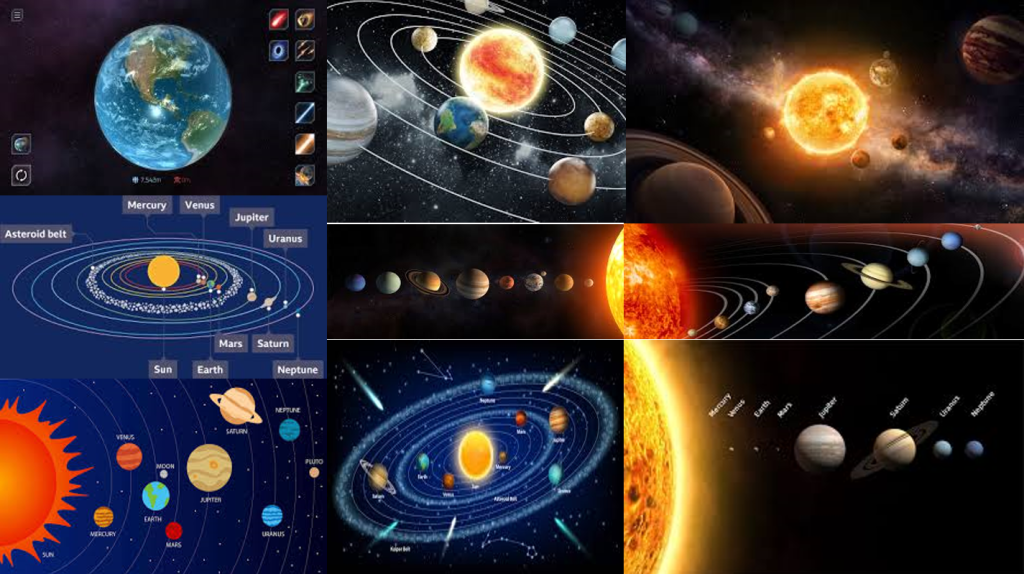
With the Images I found, I want the experience to be whimsical in terms of visuals (as the user goes through the system and looks at the majestic planets close up) and I want it to remain factual by creating the orbit rings, maintaining correct size proportions of planets within the system and maintaining the correct colour palate for all of the planets.
Looking into user movement and limiting potential motion sickness, I decided to make it so that the planets are all ready aliened so the player/ user can move from one planet to the next (following a trail) without much need for extreme movement (going from one end of the system to the other if the planets are orbiting at there own pace).
For a factual standpoint, the user can learn about the planets with the visuals provided (where the planets are at within our solar system, how big they are in relative to each other (of course proportionally accurate sizes) and what do they look like. Some light text could be involved to teach the user more about each planet.
Or another idea would be that I would narrate the facts to the user during post production instead of just using text boxes.
I want the user to have a nice overall experience with the solar system by toning down the facts (so it won’t be too much for the user) and the visual style can be pretty basic but nice to look at (not to overstimulate the user with complex designs and structure).
I did however, consider adding Pluto as the 9th and final planet in the solar system experience but after researching on multiple sources online, I found many that say that Pluto is no longer a planet anymore due to it technically being a dwarf planet.
So with that research made, I decided not to add Pluto in the solar system and plan to make Neptune the final planet in the solar system. It did feel strange though because as a kid I’ve always learned that Pluto was the final planet and ending on Neptune feels weird.
Project Plan
My overall plan for this project is to create an experience where the player can explore our solar system with the use of a VR art software called Open Brush. The user get to see the Sun, Mercury, Venus, Earth, Mars, Jupiter, Saturn, Uranus and Neptune. This will include planets that will be proportionally correct in size to each other, the look of the planets needs to be similar to what most facts and sources state otherwise It may brake the immersion of the experience.
I will also add the orbit rings around the sun so I can place the planets on those rings. Even though the rings aren’t present in our solar system, I wanted to add them for a few reasons; to allow me to figure out and measure where and how far the planets needs to be from each other (also in relation to the sun) and to link back to almost every illustration about the solar system in existence having the orbits in my experience can remind the user that this experience is to teach them the basics of our solar system.
Another way immersion could break in my VR experience is that the user my stray from the path I lead it in my experience. This a lot harder to fix from a functional aspect, but If I created a path this may avoid the user from straying from the path. I have a few ideas to avoid this from happening.
- Make the trail look visually attractive by adding some noticeable light effects and nice smooth colours
- Beyond the solar system will be an endless black void (having that, may make the user hesitate to wonder aimlessly into the void)
- Make each planet feel good to look at by adding effects, light sources or have attractive colours (whilst maintaining accuracy)
The experience will help the user passively learn more about our solar system. So by creating this experience, it will guarantee not only a fun experience for the user (letting the user see the accurate planets I create and the VR functions allowing the person fly around the planets) but also learn more about the planets first hand by seeing what they look like and their size difference.
The user starts off in a dark void and theirs only a singular light path that leads you to a small solar system that the player can fly into and experience it in full size (if they want). This basically makes the user feel like a god as they fly or teleport through the solar system. As the player/ user explores and feels lost they can always follow the light dust stream floating in space.
They start off with the sun, seeing a boiling hot ball of magma and work there way through Mercury a planet that looks grey, Venus a very hot planet despite being further from the sun, Earth being habitable of life, Mars being red due to being covered in iron oxide dust, Jupiter being a gas giant and having a large diameter being eleven times the amount that earth has, Saturn being intangible and it’s rings aren’t solid, Uranus being made of mostly water, ice, methane, ammonia and a small rocky core in the middle, and Neptune’s tone of colour is slightly different (Neptune being a darker blue colour compared to Uranus being a cyan colour, it is also made up with water, ice, methane, ammonia).
Post Production
For the assignment, I need to record and post a video link of the experience in a production blog post. The software (that I will be using to make the video) is Premier Pro. Here I will edit the video and with the help of OBS (a general recording software) I can also record and implement my sound into the video. I might be adding a constant relaxing music and a voiceover talking about the facts of each of the planets. After that I’ll post my video on YouTube.
Concept Storyboard
I created a rough storyboard for the VR experience that shows everything from start to finish. The software I used to create this story board was Photoshop. It is the preferred software I can use to create basic mock ups of my idea.
I also colour coordinated some key parts of the storyboard for example, movement (the purple arrows shows where the user goes and what they will experience when they follow the arrow or in their case a trail of some sorts to each segment of the experience chronologically) key objects are coloured red, (to signify importance) black to show certain camera controls (how I perceive the experience should go) and all of the planets drawn are coloured to their respective looks to create a difference within each of the storyboard segments (if the planets where monochromatic in colour, they can look pretty boring as the scenes look similar to each other throughout the storyboard.
When creating the storyboards, I used a new technique to create a sense of depth within a storyboard (even though storyboards are meant to be used for video and picture style forms of media and entertainment). That technique was to have the box surround the scene, not apply in some certain scenes of the storyboard. Those scenes include how the user passes a planet to go to the next planet. Having an object or scene exit the box adds some depth into the storyboard and naturally feels strange because that’s not how usual story boards work.
But for a VR experience, It can work that way and can give others a better understanding of how the experience should go. The storyboard Starts from top left and ends at the bottom right where it says “The End”.
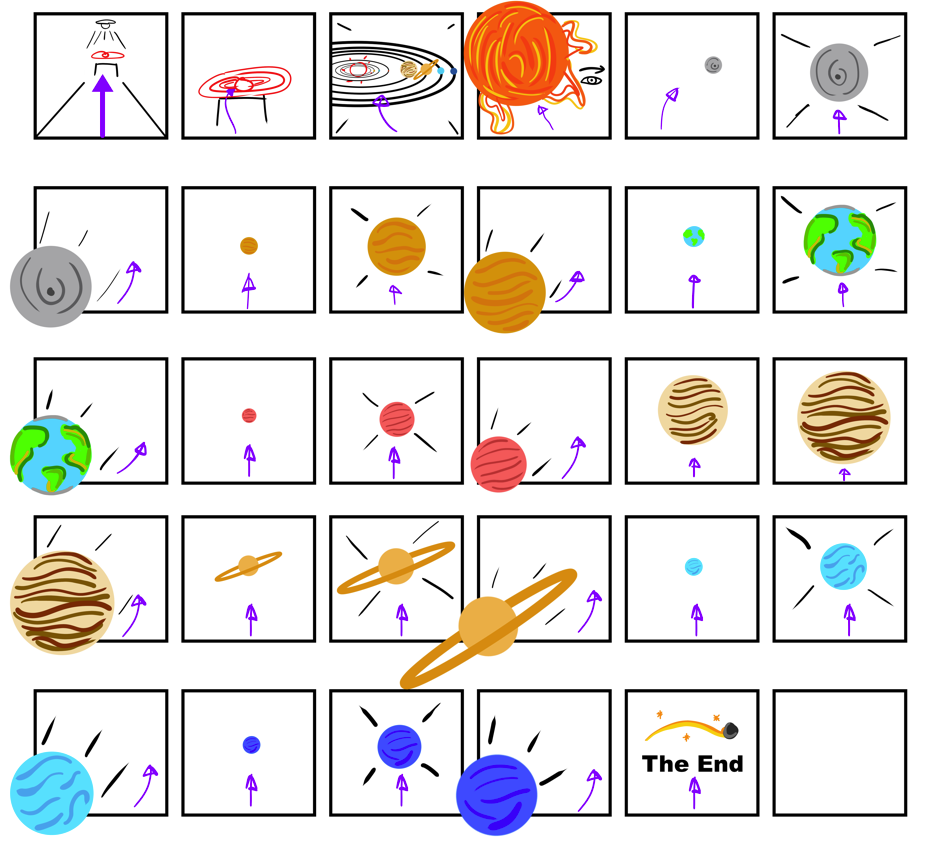
Creating this story board gave me a better understanding of what my experience should look like and also helped me to realise what I needed to do VR art wise. Those Include what planets to create, (Mercury, Venus, Earth, Mars, Jupiter, Saturn, Uranus and Neptune) how big the experience is (walking up to the mini solar system and flying into the experience and seeing the planets up close in their proportionally accurate size) and an overall fluent rundown of the entire project. It also made me realise how simple and straight forward my experience may seem.
Production Timeline (Excel)
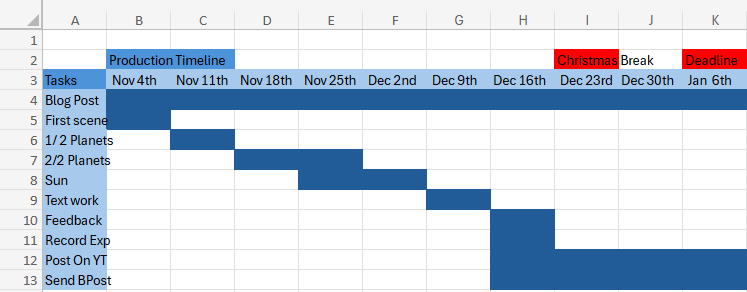
This is my very rough production timeline of tasks I needed to finish before the deadline. At first I struggled in creating this because I always think too literal when doing something like this where I wonder If I can do these tasks in the time or not and ending up being concerned for the future.
But I realised when I finished this timeline in Excel, I felt I gained a better understanding of how I will complete the VR experience and knowing that I have technically 3 months to complete it and thought about each of my tasks, I felt a little more confident in my self to finish those tasks.
Those tasks include the blog post itself, the first scene (where the user starts), planet progress, text work progress, feedback, recording of experience, post recording on YouTube and send the portfolio blog production post.
References
Websites
Brush, O. (2020) Open Brush. openbrush.app. Available online: https://openbrush.app/ [Accessed 29 Oct. 2024].
NASA (2023a) Neptune – NASA Science. science.nasa.gov. Available online: https://science.nasa.gov/neptune/ [Accessed 29 Oct. 2024].
NASA (2023b) Venus – NASA Science. science.nasa.gov. Available online: https://science.nasa.gov/venus/ [Accessed 29 Oct. 2024].
NASA (2024a) Facts About Earth – NASA Science. science.nasa.gov. Available online: https://science.nasa.gov/earth/facts/ [Accessed 29 Oct. 2024].
NASA (2024b) Mars – NASA Science. science.nasa.gov. Available online: https://science.nasa.gov/mars/ [Accessed 29 Oct. 2024].
NASA (2024c) Mercury – NASA Science. science.nasa.gov. Available online: https://science.nasa.gov/mercury/ [Accessed 29 Oct. 2024].
NASA (2024d) Saturn – NASA Science. science.nasa.gov. Available online: https://science.nasa.gov/saturn/ [Accessed 29 Oct. 2024].
NASA (2024e) Uranus – NASA Science. science.nasa.gov. Available online: https://science.nasa.gov/uranus/ [Accessed 29 Oct. 2024].
Nasa, N. (2024) Jupiter – NASA Science. science.nasa.gov. Available online: https://science.nasa.gov/jupiter/ [Accessed 29 Oct. 2024].
Thompson, S. (2020) Motion Sickness in VR: Why it happens and how to minimise it. virtualspeech.com. Available online: https://virtualspeech.com/blog/motion-sickness-vr [Accessed 29 Oct. 2024].
Universe, W.R. (2024) Using light and color in game development: a beginner’s guide. MY.GAMES. Available online: https://medium.com/my-games-company/using-light-and-color-in-game-development-a-beginners-guide-400edf4a7ae0 [Accessed 29 Oct. 2024].
Images
Ashwin (2015) Why Is Pluto Not A Planet Anymore? Science ABC. Available online: https://www.scienceabc.com/nature/universe/journey-of-pluto-why-it-lost-its-status-as-a-planet.html [Accessed 29 Oct. 2024].
Bartlett, R. (2022) 8 Things You Need to Know About the 8 Planets in Our Solar System | High Point Scientific. www.highpointscientific.com. Available online: https://www.highpointscientific.com/astronomy-hub/post/astronomy-101/8-things-you-need-to-know-about-the-8-planets-in-our-solar-system [Accessed 29 Oct. 2024].
BBC Bitesize (2022) Features of our solar system guide for KS3 physics students – BBC Bitesize. BBC Bitesize. Available online: https://www.bbc.co.uk/bitesize/articles/zxyw7yc#zd6g8p3 [Accessed 29 Oct. 2024].
FunKids (2016) Top 10 Facts about The Solar System. Fun Kids – the UK’s children’s radio station. Available online: https://www.funkidslive.com/learn/top-10-facts/top-10-facts-about-the-solar-system/ [Accessed 29 Oct. 2024].
Games, P. (2021) Solar Smash. Google.com. Available online: https://play.google.com/store/apps/details?id=com.paradyme.solarsmash&hl=en_GB&pli=1 [Accessed 29 Oct. 2024].
NASA (2024) Planets – NASA Science. science.nasa.gov. Available online: https://science.nasa.gov/solar-system/planets/ [Accessed 29 Oct. 2024].
Plait, P. (2017) Scaling the solar system. SYFY Official Site. Available online: https://www.syfy.com/syfy-wire/scaling-the-solar-system [Accessed 29 Oct. 2024].
Robert Roy Britt (2017) Solar System Planets: Order of the 8 (or 9) Planets. Space.com. Available online: https://www.space.com/16080-solar-system-planets.html [Accessed 29 Oct. 2024].
Vanstone, E. (2022) How big is the Solar System? Science Experiments for Kids. Available online: https://www.science-sparks.com/how-big-is-the-solar-system/ [Accessed 29 Oct. 2024].